Thursday, 20 November 2014

Editing: Fitting Shots Together

                                                           
I decided to add the next few shots of what were going next in my trailer. In this picture above, it shows how I added a new shot. You right click on one of the squares and click on "add media", and then from "PC files". When it comes to this, it brings up all the shots that I have taken, you just select and it will appear on your screen, ready for you to edit together with your other shots.


This is what it looks like when the shots have uploaded, from this, you drag down to the bottom (where the other 2 shots of the actress are) and this is then when you can begin editing the shot's together with the other two that are down there and that I done before.

This is what it looks like after all the shots have been dragged down to the bottom, ready to
be worked on and edited together ready to fit into my trailer.
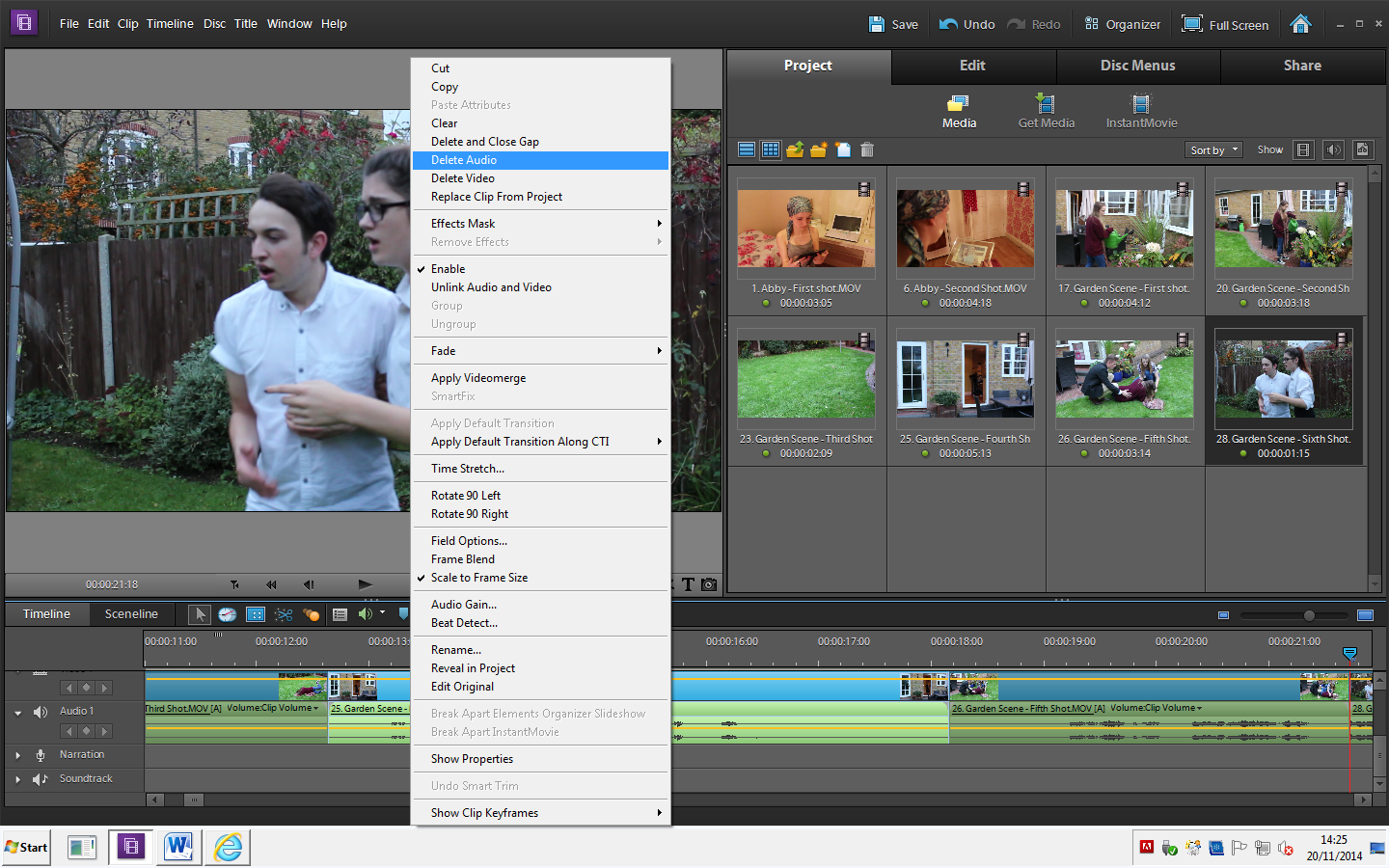

The next step I done was take the audio away from the shots, this is as I have slow, piano music in the background and I didn't want to much speech to be in the trailer, only in specific parts. I have also included voice over in the trailer, so in this part of the trailer, the voiceover and quiet sound is occurring.


The last step of editing the basic shots together, is by shortening them and making them fit into a trailer style.

Monday, 17 November 2014

Editing: Trailer Format


I decided to start editing some of my first shots together. At this point, I was just playing around and seeing what order I wanted to put my shots in, and what looked best, and also if I wanted to dissolve one shot into another or something.
When I had finished looking around the editing programme and had tried some different things out, I started to have more of an idea of what I wanted to do.


From this, I decided that I needed to put a dissolve or something in-between my two shots. I decided I needed to do this as the one shot would just jump into the other shot, and it didn't look smooth it just looked like two shots cut together, which isn't what it should look like. However, when adding in this "Cross Dissolve" effect, it looks more gentle and sleek.

 I then decided to cut down the size of shots, as some of them lasted a lot longer than wanted and if I put them in as a full shot, it would look more like a short film, as I came to the conclusion that I wanted my trailer to be short and snappy shots and didn't want it to drag. From this, I decided to cut my shots down from around 5 seconds each, to around 2 - 3 seconds each.

Saturday, 15 November 2014

Voiceover


Voice over  
At the beginning of my trailer, it begins with quiet piano music, and a voice-over from my main actress who plays Grace.
When planning my trailer, I decided to use a music studio to record the voice of my actress, so that when I came to editing this in my trailer, the sound would be a lot clearer and would sound a lot more professional than it would if I was videoing her voice on a video camera or phone device.


Thursday, 13 November 2014

Filming


These are some pictures of me filming my actresses on the scene of Grace and her mother having an argument. We started off by rehearsing and practicing, and also blocking exactly where we wanted to shoot the scene, we then went through the script altogether, to make sure the two actresses knew their lines, then we went on to film the scene. 


Blocking: Friends Scene


Friends Scene:
When filming this scene, I was unable to decided which position I wanted to put my camera so t hat it showed everyone's face, showing them all having a good time and although Grace isn't very well, she still spends time with her friends and has a laugh. This is a quick shot in my trailer, cut with a shot of Grace laughing and then Jessica laughing. In the end, I decided to go with the 3rd picture as in the shot it clearly shows all of them having fun and the position of the camera shows the majority of peoples faces.
I decided in the end to position it mid/high shot as it portrayed Grace not worrying about her illness as she was with her friends and she felt just on level as everyone else. The high shot represented that the illness was still a barrier (ie: she couldn't drink wine like the rest of her friends, but had to have a glass of water instead).

Tuesday, 11 November 2014

Blocking: Baby Photo Scene


Baby Photo Scene
When filming these shots, I couldn't decided where to place the camera, as I wanted to show everyone in the scene, and didn't want anyone's back towards the camera. By taking pictures, helped me as I looked back and could tell what looked the best and which angle was more suited to the shot. I decided to go with the positioning of the 4th picture as it showed the whole families reactions and also was on an angle in which you could actually see the pictures. However, in the 4th picture, it is slightly at a higher angle than I actually done. I felt like I wanted to do a mid shot, when shooting this scene as it showed that although Grace wasn't very well, these family times that they were having were overcoming the illness and wasn't defeating the family, in which is shown in other shots in the trailer.

Monday, 10 November 2014

Blocking: Bedroom Scene


Mum and Dad - Bedroom Scene
Before filming my scene with my actors, I decided to place them where they would be in the scene and then take pictures from different places and angles in the room to decide where I definitely wanted to place to camera, making sure I was 100% happy with where the scene was being shot and portrayed exactly what I wanted it to.  After taking pictures, I decided that picture 2 was where I definitely did want to shoot and angle my camera. This is as it portrayed the fact that the situation of their daughter being ill was over-powering them and tearing the family apart as it was a high angle shot.